

Train NEP machine-learned interatomic potentials in PyTorch — the models run directly in GPUMD.


Documentation · Quick start · Examples · Citation
TorchNEP is a from-scratch implementation of NEP4, the neuroevolution potential architecture.
- GPUMD-compatible —
nep.txtfiles load directly into GPUMD for molecular dynamics - Two-stage training — a force-focused stage, then an energy-focused stage
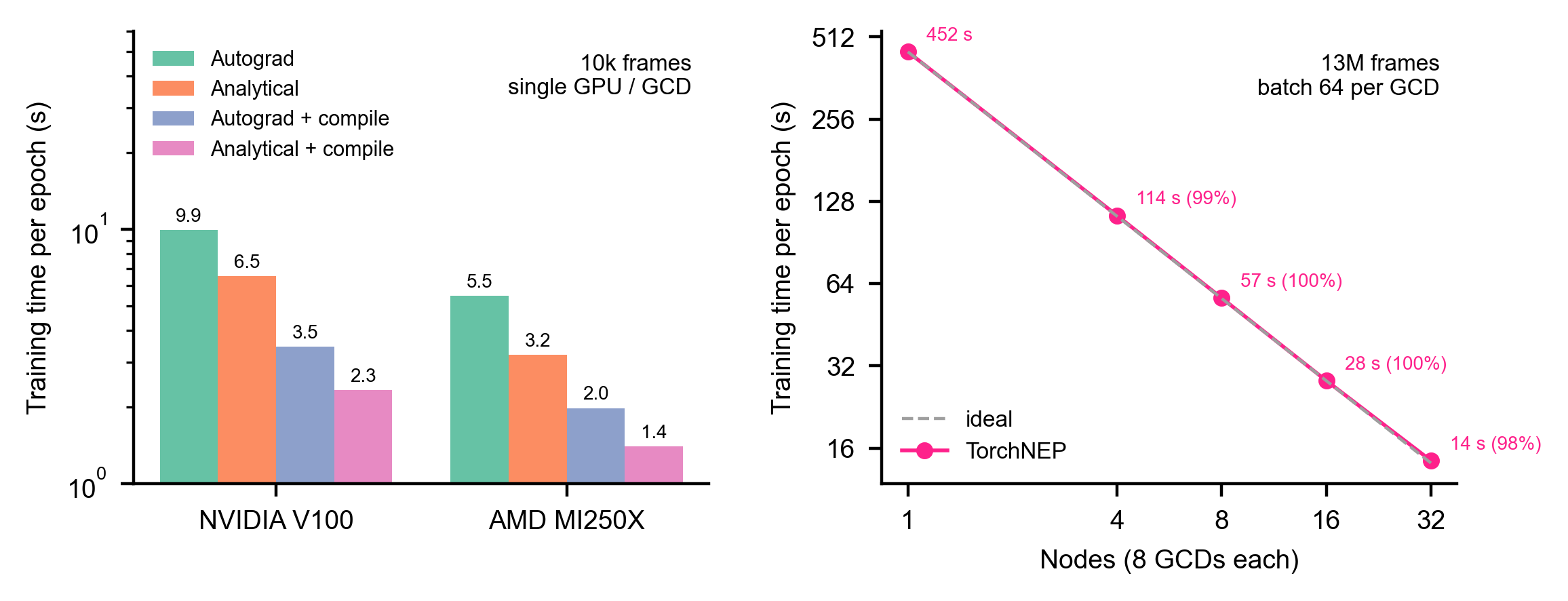
- Multi-GPU and multi-node — data-parallel training with near-linear scaling
- Fast on NVIDIA and AMD —
torch.compilewith automatic backend selection, tuned on CUDA and ROCm - Memory-friendly — the dataset stays in host memory; GPU memory scales with the batch, not the dataset
- Fine-tuning, ZBL, plots — start from any
nep.txt, add short-range repulsion, plot every run - Active learning — choose the MD frames worth computing with DFT, with one model (MaxVol extrapolation grade)
Install the PyTorch build for your hardware first, then:
pip install torchnep -UOptional extras: torchnep[ase] (ASE calculator), torchnep[plot] (figures), torchnep[all].
from torchnep import train_nep

train_nep("nep.in", "train.xyz", output_dir="output", valid_ratio=0.1)
The best model is written to output/nep_best.txt. The documentation covers nep.in, the training data format, multi-GPU training, restart and fine-tuning, prediction, the ASE calculator, plotting and active learning.
pip install -e ".[dev]"
TORCHNEP_TEST_DDP=1 pytest -n auto    # CPU; GPU-only tests are skipped
The coverage badge is this CPU run in CI. On 2 × NVIDIA GH200 the full suite (716 tests, including GPU training with torch.compile and multi-GPU training) covers 94 % of the code (October 2026). How to run it on your own GPU machine: Running the test suite.
The site is built from docs/ with MkDocs Material. In a clone of the repository:
pip install "mkdocs>=1.6,<2" mkdocs-material "mkdocstrings[python]"
mkdocs serve    # preview at http://127.0.0.1:8000/torchnep/, reloaded on every edit
mkdocs build    # static site in site/
The API reference is read from the source files, so TorchNEP itself does not need to be installed. MkDocs stays below 2.0, which the Material theme does not support. Formulas ($...$, $$...$$) are rendered in the browser by MathJax, loaded from a CDN, so the preview needs an internet connection to show them; nothing else needs to be installed.
@misc{wu2026torchne,
      title={TorchNEP: Ultra-Efficient and Accurate Training of Neuroevolution Potentials},
      author={Yong-Chao Wu and Xiaoya Chang and Tero Mäkinen and Amin Esfandiarpour and Jian-Li Shao and Tapio Ala-Nissila and Zheyong Fan and Mikko Alava},
      year={2026},
      eprint={2606.19557},
      archivePrefix={arXiv},
      primaryClass={physics.comp-ph},
      url={https://arxiv.org/abs/2606.19557},
}