
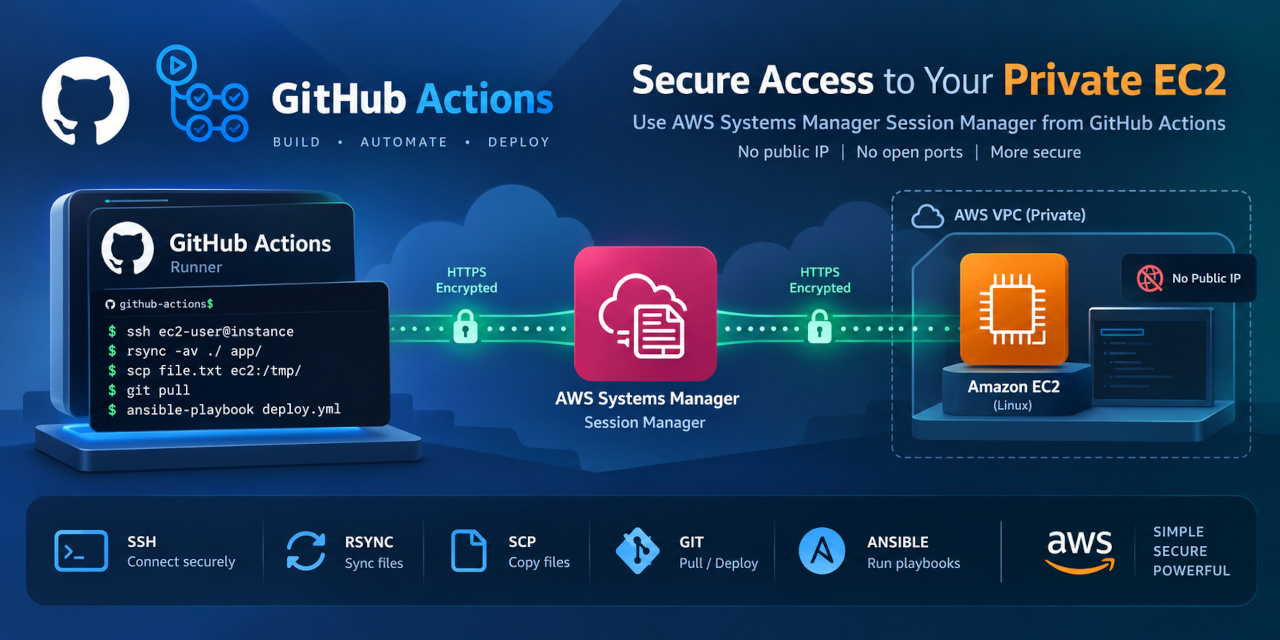


A GitHub Action that configures the runner so ordinary ssh, rsync, scp, git and Ansible can reach a
private Linux EC2 instance through AWS Systems Manager Session Manager.
Deploying to an EC2 instance from CI normally means one of two things: opening port 22 to a range of GitHub's egress addresses, or keeping a long-lived SSH private key in repository secrets. The first widens the attack surface of every instance you deploy to; the second creates a credential that never rotates and grants shell access to anyone who can read the secret. This action avoids both. It tunnels SSH through Session Manager, so the instance needs no inbound security group rule and no public IP, and it mints a fresh SSH key for each job that EC2 Instance Connect installs on the instance for sixty seconds. After the job ends, the post step removes the SSH config it wrote, deletes the key, and terminates the sessions it opened.
On the runner
- AWS CLI v2 and the Session Manager plugin on
PATH. The CLI must be recent enough to acceptaws ssm start-session --reason, which the action uses to tag its sessions. Both come preinstalled on GitHub-hosted Ubuntu runners, at versions well past the plugin's 1.1.23.0 minimum, so there is nothing to install. On self-hosted runners add them withankurk91/install-aws-cli-actionandankurk91/install-session-manager-plugin-action. - A Linux runner. This action writes
~/.ssh/configand shells out tossh-keygen.
On the instance
-
Linux only. Windows and macOS instances are not supported.
-
sshdmust be running. You can close the inbound port entirely; Session Manager reachessshdfrom inside the instance. -
SSM Agent version 2.3.672.0 or later. This is the minimum AWS documents for SSH connections through Session Manager. Older agents register fine in SSM but cannot serve
AWS-StartSSHSession. -
The
ec2-instance-connectpackage and itssshdhook, unless you supply your own key through theprivate-keyinput. The package installs anAuthorizedKeysCommandthat reads the pushed key out of instance metadata:AuthorizedKeysCommand /opt/aws/bin/eic_run_authorized_keys %u %f AuthorizedKeysCommandUser ec2-instance-connectIt ships preinstalled on the AL2023 standard AMI, Amazon Linux 2 version 2.0.20190618 or later, and Ubuntu 20.04 or later. Install it manually on the AL2023 minimal and ECS-optimized AMIs, on CentOS Stream 8/9 and RHEL 8/9, and on Ubuntu 16.04 and 18.04 (
sudo apt-get install ec2-instance-connect).If you already set
AuthorizedKeysCommandfor something else, the package will not overwrite it and EC2 Instance Connect will not work. Use theprivate-keyinput instead.
name: Deploy

on:
  push:
    branches: [ main ]

permissions:
  id-token: write
  contents: read

jobs:
  deploy:
    runs-on: ubuntu-latest
    steps:
      - uses: actions/checkout@v7

      - uses: aws-actions/configure-aws-credentials@v6
        with:
          role-to-assume: ${{ vars.AWS_IAM_ROLE_ARN }}
          aws-region: us-east-1

      - uses: ankurk91/setup-ssh-over-ssm-action@v1
        with:
          instance-id: ${{ vars.EC2_INSTANCE_ID }}
          os-user: ubuntu

      - run: ssh ssm-target 'uptime'
configure-aws-credentials exports AWS_REGION, so the region input is optional when it runs first.
Deploying a release with rsync
- uses: ankurk91/setup-ssh-over-ssm-action@v1
  with:
    instance-id: i-0123456789abcdef0

- run: rsync -az --delete ./build/ ssm-target:/var/www/app/current/

- run: ssh ssm-target 'sudo systemctl reload nginx'
Running remote commands over ssh
- uses: ankurk91/setup-ssh-over-ssm-action@v1
  with:
    instance-id: i-0123456789abcdef0
    host-alias: app-server

- run: |
    ssh app-server 'cd /srv/app && ./bin/migrate --no-interaction'
    ssh app-server 'sudo systemctl restart app.service'
Because the action writes a host alias into ~/.ssh/config rather than wrapping any particular tool,
anything that speaks SSH picks it up without modification:
- run: scp ./config/production.env ssm-target:/srv/app/.env
- run: git -C /srv archive --remote=ssm-target:/srv/repo.git HEAD
- run: ansible-playbook -i inventory.yml site.yml # ansible_host: ssm-target| Input | Required | Default | Description |
|---|---|---|---|
instance-id |
yes | — | Target instance, e.g. i-0123456789abcdef0. Hybrid mi- nodes need private-key |
os-user |
no | ubuntu |
Remote user to log in as. Use ec2-user on Amazon Linux |
host-alias |
no | ssm-target |
Name downstream steps use, as in ssh ssm-target. Must not already exist in ~/.ssh/config |
region |
no | AWS_REGION, then AWS_DEFAULT_REGION |
Region the instance runs in |
port |
no | 22 |
SSH port on the instance |
key-type |
no | ed25519 |
Type of key to generate. ed25519, or rsa at 4096 bits |
private-key |
no | — | Your own OpenSSH key, no passphrase, instead of an ephemeral one. Skips EC2 Instance Connect |
check-instance |
no | true |
Verify the instance is Online in SSM before configuring SSH |
wait-timeout |
no | 30 |
Seconds to wait for the instance to come Online. 0 fails immediately instead of waiting |
terminate-sessions |
no | true |
When the job ends, close the SSM sessions it opened |
cleanup |
no | true |
When the job ends, remove the ~/.ssh/config block and delete the key |
Booleans accept true, True or TRUE, and their false counterparts.
All inputs are validated before any AWS call. Values that end up in a file or a command are rejected if they contain whitespace, quotes or shell metacharacters.
| Output | Description |
|---|---|
host |
The SSH host alias to use in downstream steps |
os-user |
The resolved remote user |
key-path |
Absolute path to the private key |
ssh-config-path |
Absolute path to the modified SSH config |
Two roles are involved: the role the workflow assumes, and the instance profile on the EC2 instance. The policies, and the three mistakes that cause most failures, are in docs/IAM.md.
- No inbound security group rule at all. Port 22 can stay closed to everything.
- No public IP and no bastion host. Works identically for instances in private subnets.
- No long-lived SSH key in repository secrets. Nothing to rotate, nothing to leak.
- The key that is installed is ephemeral and valid for sixty seconds.
- Every session start is recorded in CloudTrail against the identity that opened it.
- Downstream tooling needs zero modification.
ssh,rsync,scp,gitand Ansible all work unchanged because the alias lives in~/.ssh/config.
What this approach costs you: keystroke logging, throughput, the sixty-second key window, and how concurrent jobs behave. All of it is in docs/Caveats.md.
Public instances need nothing extra. Private instances need a NAT gateway or VPC endpoints so SSM Agent can reach AWS. Which endpoints, and which ones cost money, are in docs/Networking.md.